


Noticias Caracol
3.585.00 Reviews
App Specs
- Version
- Varies with Device
- Updated On
- License
- Free
- Downloads
- 1,000,000+
- Developer
- Caracol Televisión S.A.
- Categories
- News & Magazines
- Platform
- Android, iOS
Screenshots







 Analysis by AppCompare
I look for a news app that helps me get oriented quickly, then lets me choose whether to read more or follow a developing story. Noticias Caracol is strongest when I want news from a Colombian broadcaster in one place, with a live signal available alongside the day’s coverage. It is less convincing as a universal news reader: its value depends on wanting Caracol’s editorial perspective, and I would not use it as my only source for every subject.
That focus is useful rather than a flaw for the right reader. I can open the app for a quick sense of what is being covered, then decide whether a headline merits more time. If I want a broad mix of international outlets, a newspaper’s app or a multi-source aggregator is a better fit. If I want Caracol’s reporting and live coverage, this app offers a more direct route.
A broadcaster-first way to follow the day
Noticias Caracol is a free news and magazines app from Caracol Televisión S.A. It is aimed at Everyone, and its reach is reflected in more than a million installs. Its average rating is 3.6 from around 4,400 ratings, alongside 77 written reviews. I treat those figures as context, not a verdict: the practical question is whether its particular mix of reporting and live video suits how I follow the news.
The app arrived on October 9, 2018, and its identity remains straightforward: a mobile home for Caracol’s news coverage. That makes it especially relevant to people who already know the broadcaster or want a Colombian news perspective while away from a television. I would not assume that every reader needs another news app; the case for installing this one is strongest when Caracol is a source you actually want to check.
Getting Started with Noticias Caracol
First things first, downloading Noticias Caracol was a breeze. Available on both Android and iOS, it didn’t take much more than a few taps to get it up and running. Once you open the app, you're greeted with a clean and intuitive interface. It's like having a personal news anchor in your pocket, always ready to deliver the latest headlines.
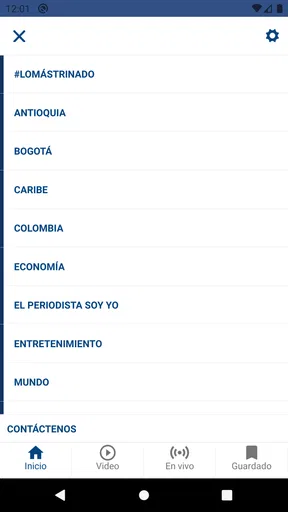
The layout is straightforward, with categories neatly organized for easy navigation. Whether you’re into politics, sports, entertainment, or weather, there’s a section for everyone. It’s perfect for those moments when you want a quick news fix without the clutter.
Diving into the Features
One of the standout features I noticed is the video section. It’s not just about reading articles; the app offers a variety of video content for those who prefer visual stories. The quality is top-notch, and the streaming is smooth, even on mobile data. I found myself watching clips on my lunch break, and it really added a dynamic touch to the news experience.
Worth Reading Before You Choose

Flipboard Shows What News Apps Must Do Beyond the Feed

Switching to Android Auto Means Rethinking Your Driving Routine

Google Calendar Makes a Crowded Week Easier to Manage

Ludo King Makes the Most of the Minutes Between Plans

Baby Panda World Brings Quick Play to Modern Phones, but Its Game Library Feels Busy

ESPN’s Live Game View Makes Following Close Games Easier
Another cool feature is the live news option. This is where the app truly shines. When something big is happening, you can tune into their live coverage, just like turning on your TV. It’s a handy tool for staying informed about breaking news as it unfolds.
Let’s not forget the notifications feature. You can customize alerts to get updates on topics you care most about. It’s like having a personal assistant nudging you when something important happens. Just be wary of overloading yourself with alerts – I had to tweak mine a bit to avoid the constant buzzing!
Reading habits that make the app more useful
I get the most out of a broadcaster-led app by treating it as a check-in point rather than a feed I need to watch continuously. A practical routine is to scan the headlines when I have a spare moment, open only the stories that affect my interests, and reserve the live signal for events where hearing the coverage as it unfolds adds something. That keeps a short news break from turning into an endless scroll.
Notifications are more useful when I think of them as interruptions with a purpose. I would start with only the topics I genuinely want to hear about promptly, then remove any alert that repeatedly pulls me away without changing what I know. For a quieter routine, checking the app at set moments can be preferable to receiving frequent prompts. The trade-off is simple: fewer alerts mean less interruption, but I may learn about a developing story later.
For readers who follow the news in more than one language or from multiple countries, I would pair this app with a source that covers those needs. Caracol’s app can provide a focused view, while another outlet can supply contrasting reporting or a wider international frame. Comparing coverage is especially worthwhile when a story is politically charged or still developing; one broadcaster’s account is a starting point, not a reason to stop checking.
When live video helps—and when it does not
The live option is most useful when pictures, a presenter’s explanation, or the sequence of events matters more than a quick headline. If I am following a major announcement while preparing dinner, for example, I can listen or watch for context instead of repeatedly refreshing a text page. For a brief update on a commute, though, a written summary is usually easier to scan and less demanding than keeping a stream open.
Live coverage also asks more of a phone and connection than reading a headline does. I would save it for a stable connection and a situation where watching is practical, rather than assume that video is always the fastest way to catch up. On a limited mobile connection, or somewhere I need to keep the screen off, text is the sensible choice. The app’s combination of formats is handy precisely because I do not have to treat every story as a viewing session.
Usability and Performance
In terms of performance, the app runs smoothly on both platforms. I haven’t experienced any crashes or major glitches, which is always a plus. It’s designed to be lightweight, so it doesn’t hog your device’s resources. This makes it a great option for older phones as well.
The app also supports offline reading. So, if you’re planning a trip somewhere without reliable internet, you can save articles to read later. This feature came in handy during my recent flight, allowing me to catch up on news without Wi-Fi.
A sensible offline routine
Offline reading works best as preparation, not as a substitute for live access. Before boarding a train or plane, I would save a few pieces I expect to have time to read, then open them while disconnected. That is more reliable than waiting until the signal disappears to look for something new. It also sets a useful expectation: saved articles can help me catch up, but a live broadcast and fresh updates depend on being connected.
For a busy day, I would use saved reading to separate news gathering from news consumption. I can collect a small set of stories when I have a connection and read them later without trying to follow a stream at an inconvenient moment. The limitation is that this workflow depends on choosing material in advance. If I want spontaneous updates during a connection gap, offline access cannot provide the same experience as a live signal.
Who should choose it, and who may prefer another source
I would recommend the app to people who already turn to Caracol, Colombian readers who want a familiar broadcaster’s coverage on their phone, and anyone who values having both written updates and a live option. It is also a reasonable choice for someone who wants a free way to check headlines without committing to a paid newspaper subscription. Its usefulness comes from that specific source relationship, not from pretending to cover every reader’s needs equally.
I would be more cautious if I mainly want a comprehensive international digest, detailed specialist reporting, or a deliberately varied selection of editorial viewpoints. A general news aggregator can make comparing outlets easier, while a publication focused on a particular subject may offer more depth. If I am seeking a second perspective on a contentious story, I would open another reputable source rather than rely on one app alone.
A realistic use case is checking the day’s headlines over breakfast, reading one relevant story before work, and saving another for a flight or a stretch of poor reception. Later, if a major event is underway and I have a suitable connection, I can switch to the live coverage. That sequence uses the app’s different formats without expecting it to replace every other source or suit every moment.
Final Thoughts
All in all, Noticias Caracol is a robust news app that delivers what it promises. It’s user-friendly, packed with features, and keeps you connected to the world no matter where you are. Whether you’re a news junkie or just someone who likes to stay informed, this app has something for you.
If you’re looking for a reliable news source that fits right in your pocket, give this app a try. You might just find it becoming your go-to for all things news. Plus, it’s free, so there’s nothing to lose!
My recommendation comes with one qualification: I would make it a go-to for Caracol’s coverage, not automatically my sole news source. Its most distinctive strengths are the broadcaster-centered presentation, the choice between reading and live viewing, and the option to prepare stories for offline reading. Those are meaningful conveniences when they match my routine; they matter less if I prefer text-only updates or want a range of publishers in a single feed.
If that balance sounds right, it is worth trying and judging against your own habits. I would keep the alerts selective, use saved articles before going offline, and turn to the live signal when watching adds useful context. For a reader who wants precisely that kind of direct connection to Caracol’s news, the app is an easy recommendation. For someone after a broader or more specialized news experience, another outlet—or a combination of sources—will serve better.
Pros
- User-friendly interface makes navigation easy.
- Real-time news updates keep you informed.
- Wide coverage of local and international news.
- High-quality video content enhances stories.
- Personalized news feed based on interests.
Cons
- Frequent ads can disrupt user experience.
- Limited offline access to news articles.
- Some content may require subscription.
- Occasional app crashes reported by users.
- Push notifications can be overwhelming.
FAQs for Noticias Caracol
What key features does the Noticias Caracol app offer?
The Noticias Caracol app provides users with real-time news updates, live video streaming, and in-depth analysis from Colombia and around the world. It includes customizable notifications, allowing you to receive alerts on topics that interest you. The app also offers multimedia content, such as videos and photo galleries, to enhance your reading experience.
Is the Noticias Caracol app available for both Android and iOS devices?
Yes, the Noticias Caracol app is available for download on both Android and iOS platforms. You can find it in the Google Play Store for Android devices and the Apple App Store for iOS devices. The app is optimized for smartphones and tablets, ensuring a seamless user experience across different devices.
Does the Noticias Caracol app support offline reading?
The Noticias Caracol app does offer offline reading capabilities. Users can save articles to read later without an internet connection. This feature is particularly useful for those who are frequently on the go or in areas with limited connectivity, allowing continuous access to news content.
Are there any in-app purchases or subscription fees associated with the Noticias Caracol app?
The Noticias Caracol app is free to download and use. It does not require any subscription fees to access the main content. However, there may be occasional in-app advertisements. Users can enjoy a comprehensive news experience without any hidden costs or mandatory purchases.
How can I customize notifications in the Noticias Caracol app?
To customize notifications in the Noticias Caracol app, navigate to the settings menu within the app. Here, you can select your preferred news categories and topics of interest. This allows you to receive tailored alerts, ensuring you are always updated on the news that matters most to you, without unnecessary interruptions.


